Mermaid diagrams on a Mac, without a browser tab
Where Mermaid renders on macOS and where it does not, which diagram types are worth using, and how to keep a diagram readable when it grows.
Mermaid turns a fenced code block into a diagram. You write:
```mermaid
sequenceDiagram
    participant W as Worker
    participant P as PSP
    W->>P: authorize(amount)
    P-->>W: declined (issuer_unavailable)
    Note over W: sleep 30s ± 6s
    W->>P: authorize(amount)
    P-->>W: captured
```
and get a sequence diagram. Because the source is text, it lives in the repository, diffs line by line, survives a rebase, and can be written by a coding agent as easily as prose. That is the whole argument, and it is a good one — a diagram that is not a binary attachment is a diagram that stays current.
The catch is rendering. Mermaid is a JavaScript library, which means something has to run it.
Where it renders on macOS today
GitHub, GitLab and most forges. Server-side, in Markdown files and in issues. If your diagram is in a README on GitHub, you are already fine — for anyone reading it on GitHub.
VS Code and friends. Built in to the Markdown preview in recent versions; an extension away in older ones. Zed, Cursor and the JetBrains IDEs all have it in some form.
Obsidian, Notion, Joplin. All render Mermaid in their own documents. Obsidian’s is essentially the upstream library.
Typora, iA Writer and other writing apps. Mermaid support is common but not universal, and versions lag, which matters because the syntax keeps growing.
Quick Look, in Finder. Only if an installed app’s preview extension does it. macOS has no idea what a Mermaid block is.
Terminal tools. glow and bat will show you the source. A terminal cannot draw a flowchart, and no amount of Unicode box characters will change that.
That leaves a specific gap: the file on your disk, not in a browser, not inside a vault, not open in an IDE. A specification in ~/Downloads. An AGENTS.md in a repository you are not currently working in. This is the case where people paste into the Mermaid live editor, which works and also means sending your architecture to a website.
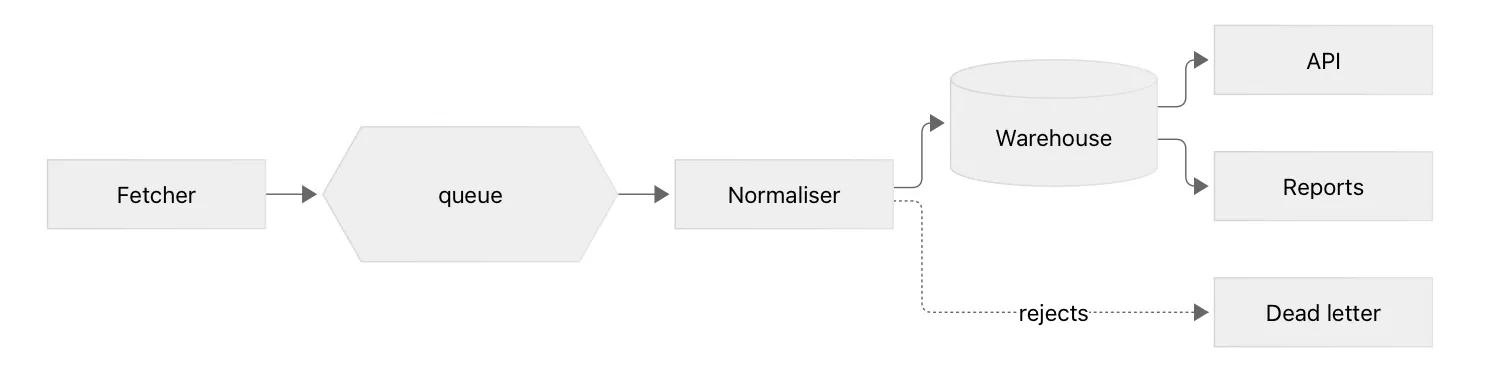
A native viewer with a Quick Look extension closes it. Hem renders Mermaid in both the window and the Quick Look panel, locally, with no network request — the library ships inside the app and is loaded only when a document actually contains a diagram.
The diagram types worth knowing
Mermaid supports a long list. Four of them do most of the real work.
graph / flowchart — boxes and arrows. Pipelines, decision trees, service maps. graph LR for left-to-right, graph TD for top-down. Node shapes carry meaning: [box], {{hexagon}}, [(database)], ((circle)).
sequenceDiagram — who calls whom, in what order. The single best way to explain a protocol, a retry, or an authentication handshake. ->> is a call, -->> a response, and Note over X gets you the annotation that makes it legible.
stateDiagram-v2 — a state machine. If your code has a status column with six values, this is that column, drawn.
erDiagram — tables and the relationships between them. Useful precisely when a schema is too small for a proper modelling tool and too large to hold in your head.
The rest — gantt, pie, mindmap, timeline, journey — exist, and occasionally one is exactly right. They are not where the value is.
Keeping a diagram readable
Mermaid diagrams go bad in a predictable way: they grow.
Cap it at about a dozen nodes. Past that, the layout engine starts making choices you would not, and the reader stops being able to follow an edge. Two diagrams at different levels beat one that contains everything.
Label the edges that need it, not all of them. A -->|rejects| B where the reason is not obvious; a bare arrow everywhere else.
Use the dotted arrow for the exceptional path. -.-> reads as “and if it goes wrong” without a word of explanation.
Give nodes short ids and long labels. N[Normaliser] rather than Normaliser[Normaliser]. The source stays narrow and the diff stays readable.
Keep direction consistent across a document. If one diagram flows left to right and the next flows top to bottom, the reader re-orients every time for no reason.
Diagrams and diffs
Because Mermaid is text, a diagram change is a text change — and it is subject to the same problem as any other Markdown: an editor that reformats blocks it parsed will happily rewrite your diagram source, reindent it, and turn a one-line change into a whole-block replacement.
It is worth checking, with the same two-minute test as any other Markdown round trip: commit a file with a diagram, change one node label in your editor, save, and run git diff --stat. More on that in why Markdown editors wreck your diff.
Maths, while we are here
The same argument applies to LaTeX. $\sigma = 4\,\text{min}$ inline, $$ … $$ for a display formula, and a ```math block if you prefer fences. KaTeX renders it, it is text in the repository, and it beats a screenshot of an equation in every way that matters.
Support is patchier than Mermaid, though — GitHub renders $…$ in Markdown, many previewers do not, and the delimiters are genuinely not standardised. If you write maths in shared documents, it is worth checking that the people you share with can see it.
Hem renders Mermaid and KaTeX in a native macOS window and in Finder’s Quick Look panel, drawing both locally with no network access. It is free, open source, and 5.7 MB.