Edit without learning Markdown
Select a few words and a small bar offers bold, headings and lists. Hem writes the formatting symbols into the file for you; you only ever see the result
Free Markdown viewer and editor for Mac · no account · works offline
ChatGPT, Claude and Gemini save their work as .md files, which a Mac opens as a wall of # and **. Hem shows them as clean pages you can edit like any other document. Nothing to learn
Version 1.2 · 5.7 MB · macOS 14 Sonoma or later · Apple silicon
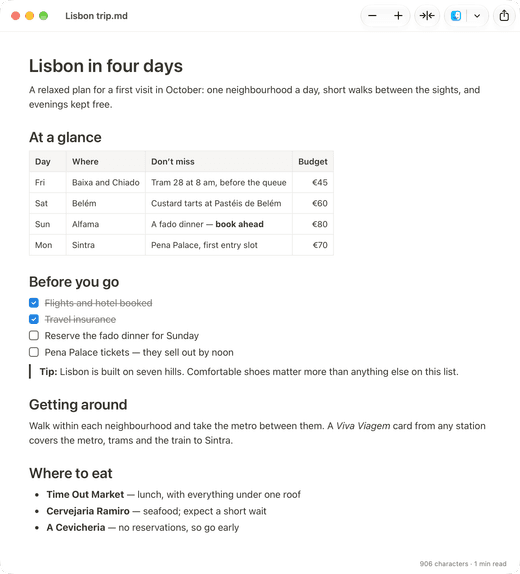
Here is a file exactly as an AI saved it, the way TextEdit shows it, next to the same file in Hem. Open one of your own to compare: it is read in this browser tab and goes nowhere else
In Hem
Drag it into Applications. It is free, 5.7 MB, and there is nothing to sign up for
The first time Hem opens, it offers to become the app for .md files. One click, and any file from your AI opens here when you double-click it
Click into the text and type. Hem saves as you go, into the same file, so it is always ready to send on or to hand back to your AI
Plans, reports, summaries, study notes: whatever you asked your AI for, Hem shows it the way the chat did, and lets you take it from there
Select a few words and a small bar offers bold, headings and lists. Hem writes the formatting symbols into the file for you; you only ever see the result
Your changes go into the same file, not a converted copy. Give it back to your AI and every heading, list and table is still there for it to work with
No account, no cloud, nothing uploaded. Hem opens the file right where it is and works without an internet connection
Select a .md file in Finder and press Space. It opens as a page in the same preview you use for photos and PDFs
How the preview works →AI answers are full of comparisons and to-do lists. Hem shows them as proper tables and as boxes you can tick
Export a Word document or a PDF for someone who has never heard of Markdown, or copy the text straight into Mail, Pages or Google Docs with its formatting
From .md to Word, step by step →It is an ordinary text file that uses a few symbols to mark the formatting, a convention called Markdown. AI tools write in it because it is simple and they read it back without mistakes. A Mac just doesn’t come with an app that turns those symbols into a page, so TextEdit shows you the symbols instead
In Hem you never have to type them. They stay in the file for your AI and for other apps; you work with the page
Every way to open a .md file on a Mac →| In the file | What you see in Hem |
|---|---|
| # Lisbon in four days | Lisbon in four days |
| A fado dinner, **book ahead** | A fado dinner, book ahead |
| - Time Out Market | Time Out Market |
| - [x] Travel insurance | Travel insurance |
| | Sat | Belém | €60 | | SatBelém€60 |
Install Hem and double-click the file. The first time Hem opens it offers to become the app for .md files; if you skipped that, select the file in Finder, press ⌘I, pick Hem under “Open with” and click “Change All…”
No. You read and edit the page as you see it. Select text and a small bar offers bold, headings and lists, and the Format menu has the rest; Hem writes the Markdown symbols into the file for you
Yes. Copy the answer in ChatGPT, Claude or Gemini and paste it into a Hem document: headings, lists and tables arrive formatted, and stray ** and # turn into the formatting they stand for
Yes, in Hem choose File › Export as PDF… or File › Export as Word Document…. To put part of it into a document you already have, copy it in Hem and paste: headings, lists, bold and tables come with it
Yes, editing included. Hem is MIT-licensed open source: no account, no trial, no paid tier, no feature held back. If it is useful to you, you can support it through GitHub Sponsors
No. Hem opens files where they are on your Mac and has no account and no cloud. The only thing it asks the internet for is an update check, and only if you allow it on first launch
Only where you edit it. Opening a file never touches it, and saving rewrites just the parts you changed, in the style they were written in. Everything else stays exactly as your AI wrote it
Install Hem and open it once — that first launch registers its Quick Look extension. Then select any .md file and press Space. If another app’s preview shows up instead, pick Hem in System Settings › General › Login Items & Extensions › Quick Look
Typora is a paid writing app. Obsidian wants your files inside its own vault. VS Code is a programmer’s editor that shows you the symbols unless you open a preview beside them. Hem is free, opens any .md file where it is, previews it in Finder, and lets you edit the page itself
macOS 14 Sonoma or later, on a Mac with Apple silicon (M1 or newer). It opens .md, .markdown, .mdown, .mkd and .mkdn: GitHub Flavored Markdown, KaTeX maths and Mermaid diagrams
If you write Markdown by hand, Hem keeps your source the way you wrote it and handles the heavier syntax too
Click a paragraph, table or list and type. Hem saves only what you touched, in its original style, so a diff shows your one-line fix rather than a reformatted file
Why other editors rewrite it →Keep CLAUDE.md or a plan open while your coding agent rewrites it. The page follows the file on disk, so you read what it wrote as it writes it
GitHub Flavored Markdown with syntax highlighting, Mermaid diagrams and LaTeX through KaTeX, in the window and in the Finder preview alike
Mermaid on a Mac →Version 1.2 · 5.7 MB · macOS 14 Sonoma or later · Apple silicon
Hem is free and stays free. If it saves you time, you can buy me a coffee