ChatGPT gave me a .md file. How do I open it on a Mac?
Why AI chats hand you .md files, what is inside one, and the quickest ways to read, edit and pass it on as Word, PDF or back to the AI on a Mac.
Nothing is broken. A .md file is an ordinary text document with a few formatting marks in it: # for a heading, ** around bold words, | between the columns of a table. The chat window was quietly turning those marks into formatting for you. Your Mac does not know how, so it shows you the marks instead. Open the file in an app that understands them and it looks the way it did in the chat again.
Why the AI handed you a .md file
AI chat tools write their answers in a format called Markdown. It is a set of simple typing conventions that lets plain text carry headings, lists and tables. When ChatGPT shows you a bold word, what it actually produced was the word with two asterisks either side, and the chat page drew it in bold.
So when you ask for “a file” or “a document you can download”, the easiest thing for the AI to save is exactly what it already wrote. The file gets the extension .md, short for Markdown. How the main tools get there today:
- ChatGPT can create files when you ask for them, using a built-in tool that runs small programs in a temporary workspace. You get a file tile or a download link. Those links point to that temporary space, so if one says the file cannot be found, ask ChatGPT to create it again and save it straight away.
- Claude usually puts longer documents in a panel beside the chat, which Anthropic calls an artifact. Downloading a text document from that panel usually gives you a
.mdfile. Claude can also create Word documents and PDFs if you ask for them by name. - Gemini has been able to generate files on request since April 2026. Markdown is one of the formats, alongside PDF, Word, Google Docs and plain text.
If you did not name a format, Markdown is the natural default: the AI is saving its own handwriting.
What the file really is
Open it in TextEdit and you see everything there is: text, and the marks. No hidden layout, no embedded fonts, nothing that can run on your Mac. It is the same kind of file as a .txt note, which is why it opens on any computer, stays readable for years and can go back to any AI without losing anything. If you want the longer version, what is an .md file goes into the marks one by one.
Why double-clicking it goes wrong
macOS has no built-in way to display Markdown. Double-click a .md file and it opens in TextEdit, or in Xcode if you have ever installed it, and both show the raw text. Your document is fine; it is the wrong app.
Reading it properly
You need an app that draws the formatting. The options on a Mac:
Hem. A free, open source Markdown app for macOS 14 or later. On first launch it offers to become the app that opens Markdown files, so from then on double-clicking any .md shows a formatted page: headings, bold, lists, tables, checklists, code and even diagrams. After you have opened it once, you can also select a .md file in Finder and press Space to preview it without opening anything. It is Mac only; there is no Windows, iPhone or web version.
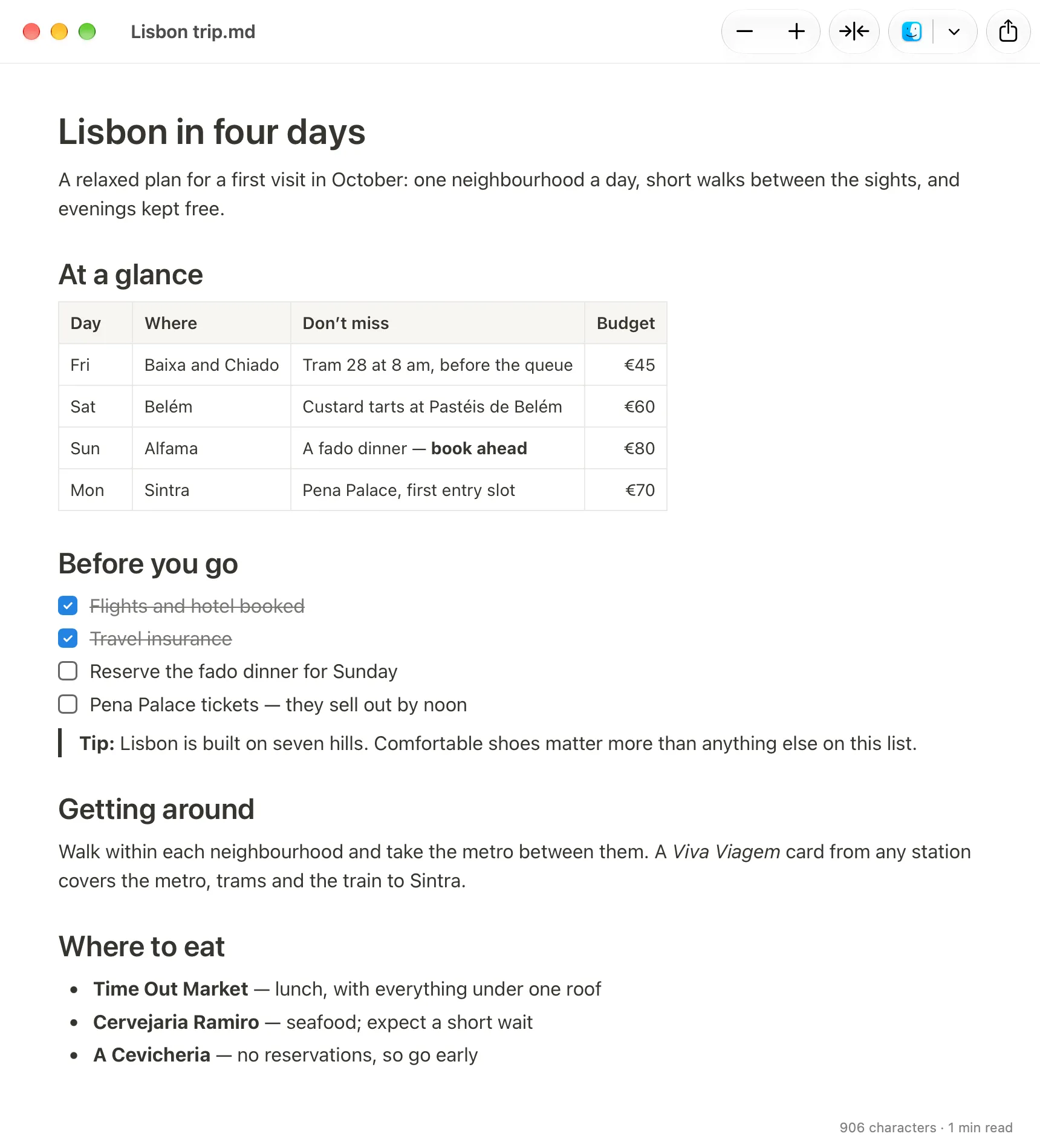
Typora. A good editor that also shows formatted text rather than symbols. It is paid, with a free trial.
Obsidian. Excellent for building up a collection of notes, but it wants your files inside its own folder, called a vault. For one file someone sent you, that is a lot of set-up.
VS Code. A programmer’s editor that can show a preview beside the raw text. It works, but it is heavy machinery for reading four pages.
Google Docs or OneDrive. Upload the .md file to Google Drive and open it with Google Docs, which has understood Markdown since 2024. Microsoft added Markdown viewing and editing to OneDrive and SharePoint in 2026. Both are sensible if your documents already live there, and both mean the file goes to the cloud first.
One to be careful with: websites that offer to “view” or “convert” Markdown for you. They work, but you are uploading your document to a stranger’s server. For a CV, a contract draft or anything from work, use something on your Mac.
Fixing a few things
Often the AI got it nearly right and you want to change a date or delete a paragraph. In Hem you edit on the formatted page itself. Click into the text and type. Select a few words and a small bar appears with bold, italic, headings, lists, quote and link. The Format menu has the same, with the usual shortcuts: ⌘B for bold, ⌘I for italic, ⌥⌘1 to ⌥⌘3 for headings. You never have to type an asterisk. Changes save automatically into the same .md file, and only the parts you touched are rewritten, so the file stays a normal .md that any AI or other app can still read. If you only want to read and are worried about typing into it by accident, View > Read Only (⇧⌘L) locks it.
You can also edit the raw text in TextEdit if you keep the marks tidy, or ask the AI for the change and download a fresh copy.
Sending it on
| Where it is going | Quickest route |
|---|---|
| A colleague who uses Word | Export a .docx, or copy and paste into Word |
| A printer, or someone who wants a PDF | Export as PDF, or print |
| The body of an email | Copy and paste into Mail |
| Google Docs | Paste into a document, or upload the .md to Drive |
| Back to the AI | Attach the .md file, or paste its text |
Word. In Hem, File > Export as Word Document… saves a .docx. If you would rather drop it into an existing document, select the text, press ⌘C and paste into Word; headings, bold, lists and tables come across as formatting, not symbols. The same paste works in Pages, Mail and Google Docs. Other routes, including ones without Hem, are in converting .md to Word on a Mac.
PDF. File > Export as PDF… saves one, and File > Print prints. Turning Markdown into a PDF covers other routes.
Back to the AI. Plain text is about the easiest thing you can give an AI. ChatGPT and Gemini both list Markdown among the file types you can attach. If a tool will not take the file, paste the text into the chat instead. If you have the file open in Hem while an AI tool changes it on disk, the window updates to show the new version.
Why not just ask for Word in the first place? You can: ChatGPT, Claude and Gemini can all create .docx files now. Open the result before sending it, though, because generated Word files sometimes arrive with odd spacing or tables that do not fit, and download links from a chat can stop working. A .md file kept on your Mac and exported when needed is the more dependable copy.
Which option is for you
- You just want to read it, now: install Hem, let it open Markdown files, and double-click. Or press Space in Finder for a preview.
- You want to change a few words and send it to someone: edit in Hem, then export to Word or PDF, or copy and paste into the email or document.
- Everything already lives in Google Drive or OneDrive, or you are not on a Mac: upload it there and open it in the browser.
- You get these files every day and want your own notes collection: look at Obsidian, which is built for exactly that.
- You never want to see a
.mdagain: ask the AI for a Word document or PDF by name, and check it before you send it.