Type into the page
Click a paragraph, a heading, a list item or a table cell and edit it where it stands. No split view and no preview to keep in sync
Editing without learning Markdown →Markdown editor for macOS · free · open source
Edit the formatted page: click, type, press ⌘B. Hem writes the Markdown for you and saves just the part you touched, in the style it was written in. Free, with no account
Version 1.2 · 5.7 MB · macOS 14 Sonoma or later · Apple silicon
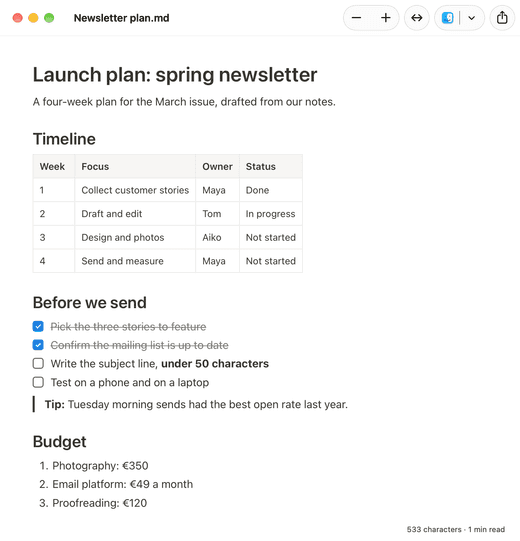
There is one view, and it is the document. You never have to read or type a symbol unless you want to
Click a paragraph, a heading, a list item or a table cell and edit it where it stands. No split view and no preview to keep in sync
Editing without learning Markdown →Select text for bold, italic, headings, lists, links and code. The usual shortcuts work: ⌘B, ⌘I, ⌘K
Saving rewrites only the blocks you edited. List markers, table padding, line wrapping and everything you did not touch stay exactly as they were
Why other editors reformat the file →Add a row, edit a cell, tick a box. The table stays a table in the file, aligned the way it was
Paste an answer from ChatGPT, Claude or Gemini and the headings, lists and tables arrive formatted. Stray ** and # become what they stand for
Why AI answers are full of asterisks →Word, PDF or a single HTML file, diagrams and maths included, or copy the page with its formatting
From .md to Word →Mac editors fall into three families. Each is right for a different job
| Kind | How it works | Good for | Examples |
|---|---|---|---|
| Page editor | You edit the formatted document; the app writes the Markdown | Files from AI tools, READMEs, docs you review more than write | Hem, Typora |
| Source editor | You type the symbols, with highlighting and sometimes a preview beside it | People who think in Markdown and want full control | MarkEdit, MacDown, VS Code |
| Writing or notes app | Markdown is the input method inside a library or vault | Long prose, personal knowledge bases | iA Writer, Obsidian, Bear |
Among page editors, the difference that matters in a repository is what happens on save: most rewrite the whole file in their own style, Hem rewrites only the edited blocks
Hem has no library, no vault, no sync and no plugin system. It opens files where they are and saves them where they are. If you want a place to keep notes, a note app will serve you better
It is also Mac only. There is no Windows, Linux, iPhone or web version
A fair comparison of Markdown apps for Mac →For editing the formatted page, Hem is free and open source with nothing held back. For editing the source text, MarkEdit and MacDown are free too. Which is best depends on whether you want to see the symbols
Yes. Hem and Typora both let you edit the formatted document directly. Hem is free and saves only the parts you changed; Typora is a paid app with themes and more export formats
No. Opening a file never changes it, and saving rewrites only the blocks you edited, in their original style. A one-word fix is a one-line diff
Hem is built around the formatted page. For hand-editing source it sits well beside a text editor: the page follows the file on disk, so changes saved elsewhere appear at once
Yes. Hem saves as you go, into the same file, with the usual Undo
macOS 14 Sonoma or later, on a Mac with Apple silicon (M1 or newer). The download is 5.7 MB
Version 1.2 · 5.7 MB · macOS 14 Sonoma or later · Apple silicon