Why AI answers are full of asterisks and hash signs
Pasted a ChatGPT or Claude answer and got ** and
The asterisks and hash signs are Markdown: a way of writing formatting with ordinary keyboard characters. ChatGPT, Claude, Gemini and the other chat tools write every answer like this, and the chat window quietly turns the symbols into bold text, headings and tables before you see them. Paste the answer somewhere that does not do that conversion and the symbols come through exactly as written.
Nothing is broken, and the text itself is fine. The fix depends on where you are pasting, and there are usually two or three ways round it.
What the symbols mean
Once you know the handful of conventions, a pasted answer is easy to read even with the symbols left in.
| You see | It means |
|---|---|
**words** |
bold |
*words* or _words_ |
italics |
#, ##, ### at the start of a line |
a heading, a sub-heading, a smaller heading |
- or * at the start of a line |
a bullet point |
1. at the start of a line |
a numbered list |
| between words, and a |---|---| line |
a table: the pipes separate columns, the dashes sit under the header row |
--- on a line of its own |
a dividing line |
> at the start of a line |
a quotation |
`backticks` |
code, or a technical term shown in a fixed-width font |
[words](https://…) |
a link |
What is an .md file goes into where this comes from and why AI tools use it.
Why it only happens sometimes
This is the confusing part: the same answer pastes perfectly into one app and arrives covered in symbols in another.
The reason is that copying puts more than one version of the text on the clipboard. When we checked in September 2026, the copy button under an answer on the ChatGPT and Claude websites put two versions there: a formatted one, with real headings and bold, and a plain-text one, which is the Markdown with all its symbols. Selecting the text with the mouse and pressing ⌘C gives you the formatted version the browser is showing. Either way, the app you paste into decides which version it takes.
So you see the symbols when the plain version wins. That happens when:
- The destination only accepts plain text. WhatsApp, text messages, most website forms and comment boxes, code editors, and TextEdit in plain-text mode have nowhere to put bold or a heading, so they take the Markdown.
- The app has its own shorthand. WhatsApp and Slack use a single asterisk on each side for bold, not two, and neither has headings or tables in ordinary messages. Double asterisks and hash signs do not match anything they know.
- You asked for plain text without meaning to. Paste and Match Style (⌥⇧⌘V on a Mac) and Word’s Keep Text Only paste option both take the plain version, which for an AI answer means the Markdown.
- The symbols are the actual content. If you asked the AI for “Markdown”, or the answer sits in a grey code box with its own copy button, or you opened a downloaded
.mdfile in TextEdit, there is no formatted version to take. The symbols are the text. ChatGPT gave me an .md file covers that case. - A different app or version copies differently. Desktop and phone apps, older versions and other assistants have not always behaved like the websites described above. If one copy button gives you symbols and another does not, this is usually why.
The fixes, easiest first
1. Use the copy button and paste into an app that understands formatting
For Word, Pages, Mail and Google Docs, this is normally all it takes: the copy button under the answer, then an ordinary ⌘V. The document app takes the formatted version and you get real headings, bold and lists.
Use plain ⌘V, not Paste and Match Style. If Word still shows asterisks, the clipboard held only Markdown, and Word has no built-in way to convert it on paste.
Gemini has another route: Share & export under an answer offers Export to Docs and Draft in Gmail, which put the response straight into a Google Doc or an email draft without going through the clipboard.
2. In Google Docs, use Paste from Markdown
Google Docs can convert Markdown itself, but the option is off by default.
- In any Google Doc, open Tools → Preferences.
- Tick Enable Markdown.
- Copy the text with the symbols, right-click in the document and choose Paste from Markdown.
The same setting adds Copy as Markdown to the right-click menu, which is useful for handing an edited document back to the AI. An ordinary paste is not affected; it still pastes whatever the clipboard holds.
3. Paste it through Hem, then copy again
When the symbols are already baked into the text, from a .md file, a code box or a message someone forwarded, a Markdown app can do the conversion for you on your own Mac.
In Hem, open a new window with File → New (or open the .md file itself) and paste. Pasted Markdown turns into formatting as it lands: headings, bold, lists, tables, checklists. Then select it, press ⌘C, and paste into Word, Pages, Mail or Google Docs. Hem puts formatted text on the clipboard, so the headings, bold, lists and tables survive the trip.
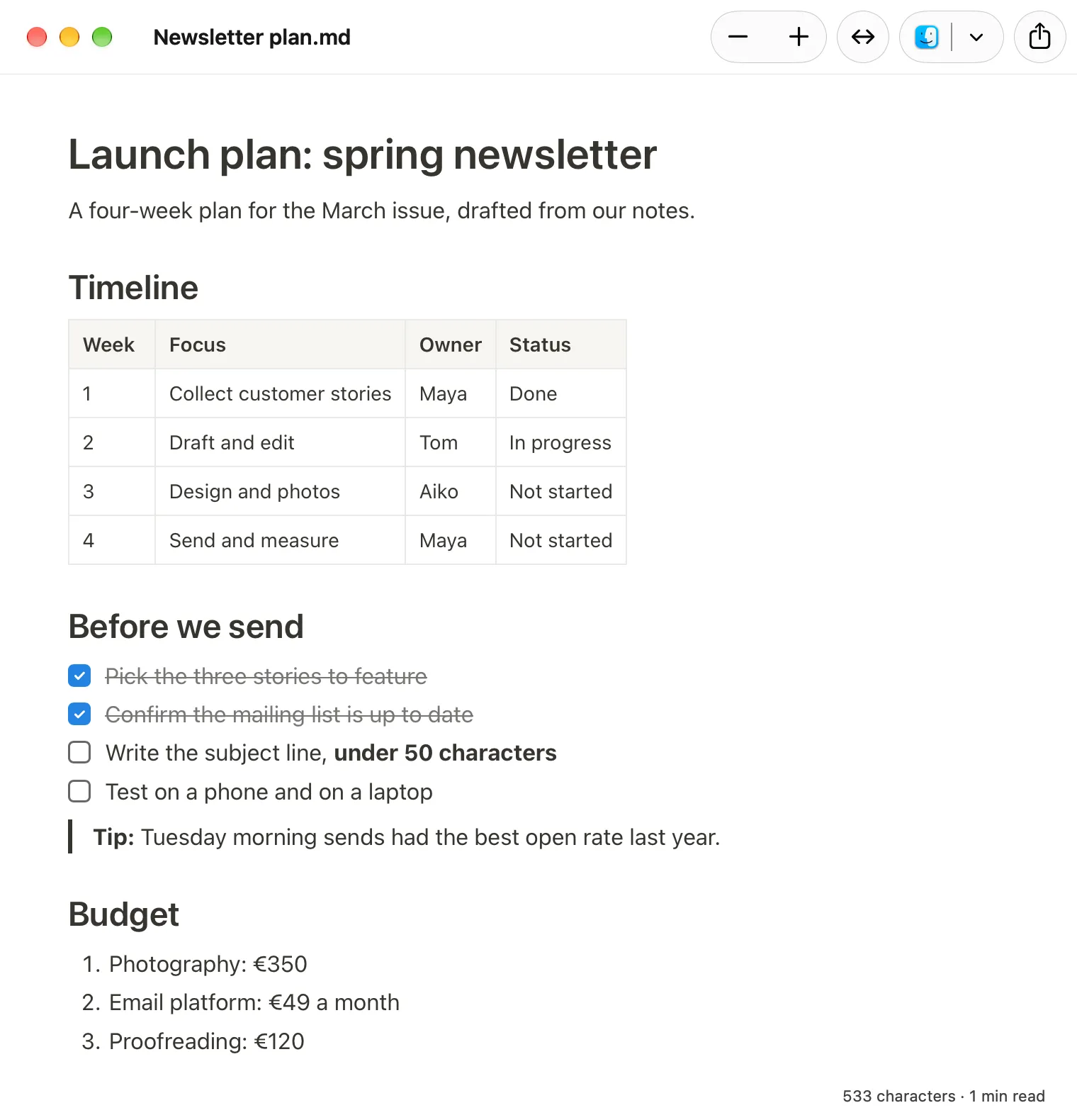
Two honest limits. Pasting from Hem into a plain-text field gives you Markdown again, because plain text has no other way to carry formatting; for WhatsApp, the next fix is better. And Hem is a Mac app only, with no Windows or iPhone version. It is free, and nothing you paste into it leaves your Mac.
For a whole document rather than one answer, File → Export as Word Document… saves a .docx directly. Turning an .md file into a Word document compares that with the other routes.
4. Ask the AI not to use formatting
For messaging apps and forms, it is easier to get an answer without symbols in the first place. Add a line to your request:
Plain text only, no Markdown: no asterisks, hash signs or tables.
For WhatsApp you can ask for its own style instead: “Format this for WhatsApp, with single asterisks for bold.” The answer will look slightly odd in the chat window and right where you paste it.
If you want this every time, ChatGPT has Settings → Personalization → Custom instructions, and Claude has a similar place in its settings for preferences that apply to every chat. Bear in mind that you then lose tables and headings everywhere, including in the documents where you wanted them. If the AI slips back into symbols in a long conversation, remind it.
5. Remove the symbols with Find and Replace
For one short answer that is already pasted, the blunt way is fine. In Word, Pages or Google Docs, use Find and Replace: search for ** and replace it with nothing, then do the same for ## and # . You lose the bold along with the asterisks, but the text reads cleanly. Tables do not survive this treatment; they are better sent through one of the fixes above.
Which fix for which destination
| Pasting into | What to do |
|---|---|
| Word, Pages, Mail | Copy button and plain ⌘V. If symbols appear, paste through Hem first. |
| Google Docs | Copy button and paste, or Paste from Markdown. From Gemini, Export to Docs. |
| WhatsApp, Slack, text messages | Ask the AI for plain text, or for WhatsApp-style formatting. |
| Website forms and comment boxes | Ask the AI for plain text, or Find and Replace afterwards. |
A .md file the AI gave you |
Open it in a Markdown app, or export it to Word or PDF. |
The symbols are not a fault in the answer. Markdown is simply the format AI tools think in, and it only looks untidy when it lands somewhere that reads it literally. Pick the destination first, and the fix follows from it.