Opens on double-click
On first launch Hem offers to become the app for .md files. After that a double-click in Finder, Mail or Downloads opens the page
Every way to open a .md file →Markdown viewer for macOS · free · open source
Double-click a .md file and read it formatted: headings, tables, checklists, code, diagrams and maths. Press Space in Finder for a preview without opening anything. Free, with no account
Version 1.2 · 5.7 MB · macOS 14 Sonoma or later · Apple silicon
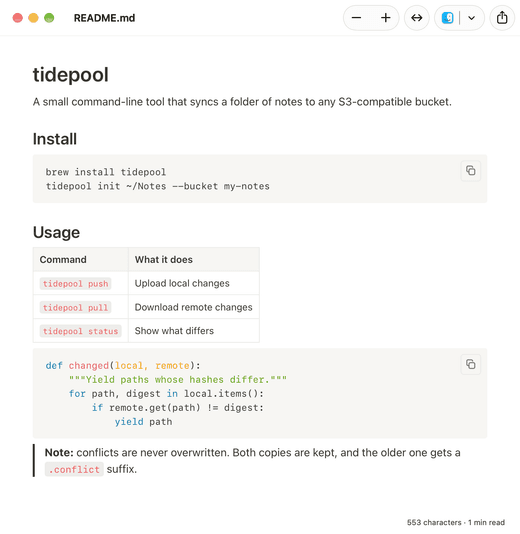
A viewer is the app you reach for when you want to read a file, not maintain it. These are the parts that matter for that
On first launch Hem offers to become the app for .md files. After that a double-click in Finder, Mail or Downloads opens the page
Every way to open a .md file →Select a file and press Space. Hem ships a Quick Look extension, so the preview is the rendered page rather than raw text
Quick Look for Markdown →Tables, task lists, strikethrough and autolinks, plus front matter shown as a tidy block instead of a stray heading
Syntax highlighting for code blocks, Mermaid diagrams drawn in place and LaTeX through KaTeX. All of it works offline
Mermaid on a Mac →When another app or a coding agent rewrites the file, the page updates. Leave a plan or a README open while it changes
Reading agent docs →A 5.7 MB download, 12 MB installed. No account, no telemetry, nothing uploaded. The only request it makes is the update check you can turn off
Open the disk image and drag Hem into Applications. It is signed and notarised by Apple
Say yes when Hem offers to open Markdown files, or set it later with ⌘I in Finder and “Change All…”
Open any .md, .markdown, .mdown, .mkd or .mkdn file as a page, or preview it in Finder
Hem is also an editor. Click into a paragraph, a table cell or a list and type; a small bar offers bold, headings and lists. Saving rewrites only the part you changed, so the rest of the file stays byte for byte as it was
And when the page has to leave Markdown, export it as a Word document, a PDF or a single HTML file, or copy it with its formatting into Mail, Pages or Google Docs
Hem as a Markdown editor →It depends on what you read. For opening .md files as formatted pages and previewing them in Finder, Hem is free, open source and does both. If you only want a Finder preview, QLMarkdown is another free option; if you already live in VS Code, its built-in preview may be enough
No. TextEdit and Quick Look show a .md file as plain text, symbols included. You need an app that renders Markdown, and one with a Quick Look extension if you want previews in Finder
Accept the offer on first launch, or select any .md file in Finder, press ⌘I, choose Hem under “Open with” and click “Change All…”
Yes. Mermaid code blocks become diagrams and LaTeX is set with KaTeX, both in the window and in the Finder preview, without an internet connection
macOS 14 Sonoma or later, on a Mac with Apple silicon (M1 or newer). The download is 5.7 MB
Yes, with editing and export included. Hem is MIT-licensed open source with no paid tier
Version 1.2 · 5.7 MB · macOS 14 Sonoma or later · Apple silicon